
There are so many software and app choices for metronomes and drum machines it can be easy to be overwhelmed. So what are the best drum machines and metronomes for guitar practice? Here we will look at a range of free and cheap ones that are great tools for guitar practice and to help develop your sense of time.
While metronomes are fairly simple there are a few things to consider when choosing one. Some metronomes accent the 1st beat of the bar with a higher pitched beep or click. While I personally find this to be annoying others like this feature.
If the metronome does offer a higher pitched beep on the 1st beat of the bar make sure that the metronome allows you to change the time signature from 4/4 (4 beats in a bar) to 3/4 (3 beats in a bar) otherwise a higher pitched beep on every 4th beat will be very distracting while you’re playing music with 3 beats to the bar!
With drum machines for guitar practice I recommend looking for the following features:
- Preset beats – you don’t want to waste precious practice time programming beats
- A good range of preset beats in 4/4, 3/4 and if possible 6/8 also check for swing/shuffle beats for playing blues and jazz feels.
- A decent sound quality or range of sounds that suit your taste in music whether it be rock, blues, jazz or pop etc.
Watch the “Introducing Guitar Strumming Rhythms & How To Use a Metronome” video.
Drum Machine and Metronome Software Recommendations for Windows PCs
Metronomes
These 2 metronomes work in a web browser making them suitable for a range of Windows PCs and Macs.
 Best Metronome
http://a.bestmetronome.com/
This metronome has a nice user friendly interface with a big start and stop button and easy selection of the BPM (Beats Per Minute) speed. The click is the same pitch for all beats.
 Metronome Online
http://www.metronomeonline.com/
This is very similar to the other metronome but the BPM selector is smaller and harder to change with the mouse. You can change the colour of the interface to suit your practice mood though 😉 Again the click is the same pitch for all beats.
Paid Drum Machines
While there are some OK free drum machine software options for Windows if you’re willing to spend a little money you can get yourself a much better sounding and more user friendly drum machine.
QuickBeat Human Drummer
www.quickbeat.com
 The best paid software drum machine is the QuickBeat Human Drummer which features a variety of styles at preset tempos. Designed for guitarists and bass players, QuickBeat features over 100 beats in 12 different styles including rock, country, blues, hip hop, metal, funk, latin, reggae, jazz and more played by professional drummers.
The QuickBeat drum machine is very simple to use and it is easy to find the right beat going for you to get on with your guitar practice. The sound quality of this drum machine is fantastic too. While it’s very similar to the next 2 options I recommend it as the best choice due to the lower cost and high sound quality.
Cost – $29.99US
 PC Drummer
http://www.pcdrummer.com/
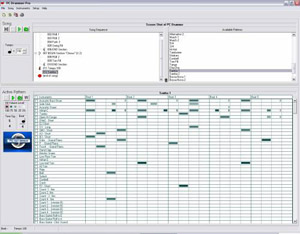
PC Drummer is also a good sounding easy to use drum machine with lots of beats covering a range of styles and time signatures suitable for most players.
Cost – $49US
Acoustica Beatcraft
http://www.acoustica.com/beatcraft/download.htm
 Similar to the PC Drummer the Acoustica Beatcraft is also a good sounding drum machine with good range of beats covering a range of styles and time signatures suitable for most players. The higher cost of this one is due to the ability to modify the beats. However do you really need to do this for guitar practice purposes?
Cost – $68.95US
 Dr Drum
www.drdrum.com
If you want to create your own beats and make them quickly and easily one of the best options is Dr Drum. This drum machine software is amazing value as it also includes a sequencer for you to create synth and keyboard parts. So if you want to go beyond just practicing with a drum machine and create backing tracks with chord changes, bass lines and more. I would highly recommend getting this software.
Cost – $29.95US
Free Drum Machines
The following software drum machines are free however they aren’t as good as the paid options. However they can be used to get a taste of what it’s like to play with a drum machine.
Monkey Machine
http://www.rinki.net/pekka/monkey/
 This Monkey Machine is quite decent with a range of user submitted beats available. It has a shuffle knob which works fairly well on most the user submitted beats to create a swing feel. Monkey Machine also offers a range of different drum kit sounds. However at the time of writing it appears that you would have to create own 3/4 loop.
Drumbot
http://www.drumbot.com/projects/drumbot/index.html
 The Drumbot does have some great sounding loops but by default they’re not well stuck together and you would have to spend a bit of time rearranging them to get a nice consistent beat and groove. Also it took some time to load each loop. The other negative with Drumbot was that I couldn’t find a 3/4 beat or a swing loop.
 Drum Machine
http://www.onemotion.com/flash/drum-machine/
This easy to use Drum Machine has some great hip hop shuffle and electro funk sounds though with no 3/4 or blues/jazz swing beats so it’s a bit limiting.
Drum Machine and Metronome Software Recommendations for Mac
Metronomes
As mentioned above these 2 metronomes work in a web browser making them suitable for a range of Windows PCs and Macs.
http://a.bestmetronome.com/
http://www.metronomeonline.com/
Paid Drum Machines
QuickBeat Human Drummer
www.quickbeat.com
As mentioned above the QuickBeat Human Drummer is also compatible with Apple Macs.
Free Drum Machines
For those using a Mac you also have the option of using the free built in music making software Garageband with comes with its own drumbeat loops.
Drumatix 606
https://www.macupdate.com/app/mac/25840/drumatix-606
 Also check out Drumatix if you’re looking for a free software drum machine option for you Mac. It is a software drum machine and bassline sequencer, using Roland TR 606, 909, 808, 707, LinnDrum and Amen Brother samples
Free iPhone & iPad Drum Machine and Metronome App Recommendations
Many people today use Apps on the iPhone and iPad and of course there are many drum machine and metronome apps to choose from for practice.
Drum Beats+ Lite (Groove Machine & Rhythm Metronome)
 http://appcrawlr.com/ios/beats-lite-instant-drum-loop-ma
This Drum Machine has 39 great natural sounding drum loops which you can set specific BPM tempo great natural drum sounds. It has good swing loops and a “waltz” loop for 3/4. For me it’s the best free drum machine app.
Drum Beats by Alvin Yu
http://appcrawlr.com/app/show/266714
 Very similar to Drum Beats+ this App has 50 loops that sound pretty good sound though some loops are a bit mislabeled with the “country” loop being a better sounding blues loop than the actual “blues loops”. You can slow down and speed up the tempo but it doesn’t offer specific BPM tempos. Nor does it have a 3/4 or 6/8 loop.
 Metronome+ by Dynamic App Design
http://appcrawlr.com/ios/metronome-4
This metronome app allows you to turn the beat 1 accent on and off and offers a range of different time signatures
.
 Steinway Metronome
http://appcrawlr.com/ios/steinway-metronome
Much the same as the Metronome+ but with a nice woodgrain finish!
Android Drum Machine App Recommendations
For android users check out the following free drum machine app.
Drums For Practice
http://mobile.afreecodec.com/drums-for-practice-92518.html?o=keywords
 The program includes various fully rendered (not midi) patterns:
- Rock drum pattern in 4 tempos
- Blues drum pattern in 5 tempos
- 3 Metal drum patterns in a total of 5 tempos
- Lead Rock drum pattern (for practicing solos) in 3 tempos
- Metronome pattern in 5 tempos
So I hope this article has given you more of an idea of what is the best drum machine or metronome for your guitar practice. You may have to try a few to find one that works best for you. Your drum machine/metronome should be your practice friend and should be used every time you practice.